
This article was written as part of my work on the talk “AI vs. Karen: Building Real-Time Sentiment Analysis Pipelines at Scale.”
In the talk, we looked into what sentiment analysis is and how to build real-time sentiment analysis data pipelines using LLMs and SLMs.
If you’ve ever asked two people the same question differently and gotten wildly different answers, you already understand LLM prompting.
The way we prompt an LLM matters - it shapes the way it performs, “thinks,” and even its personality.
Even now, as we are approaching what is probably the fifth or sixth generation of general-purpose large language models, prompting remains one of the key differentiators between mediocre AI performance and outstanding performance.
As part of the research for the talk, we ran a simple experiment:
Using a single specific model, how far can we improve its performance on a specific task by modifying only the prompt we use?
Our task: Analyze the sentiment of short product reviews, using a 5‑class sentiment classification system (very_negative, negative, neutral, positive, very_positive).
Our model: OpenAI’s gpt-4.1-mini, previously selected as the best balance of accuracy and speed for this job (will write about that in another post).
Our dataset: A synthetic, class‑balanced set of short reviews - ranging from “This product is absolutely amazing and exceeded all my expectations!” (very_positive) to “Worst purchase ever, absolutely nothing works properly.” (very_negative), and plenty of “It’s okay, nothing special but does the job.” (neutral) in between.
Our metrics: Accuracy and speed. (Cost was also a metric, but was highly correlated to speed.)
Same model. Different prompts. Big swings - in both quality and latency.
How we ran it (quick and painless)
- We tested 14 prompt templates, each against the entire dataset.
- We measured: accuracy (correctly choosing the right sentiment classification out of the 5 classes), mean latency per sample, and reliability (API/parse errors).
- We used the OpenAI API directly and parsed the results using parsing logic that matched the prompt template’s expected output.
- We allowed up to 300 tokens for the response (originally it was 100, but we had to increase it as the reasoning/CoT prompts happily ate all of that buffet).
Meet the winners
Here are the 3 winning prompts of the lot we tested:
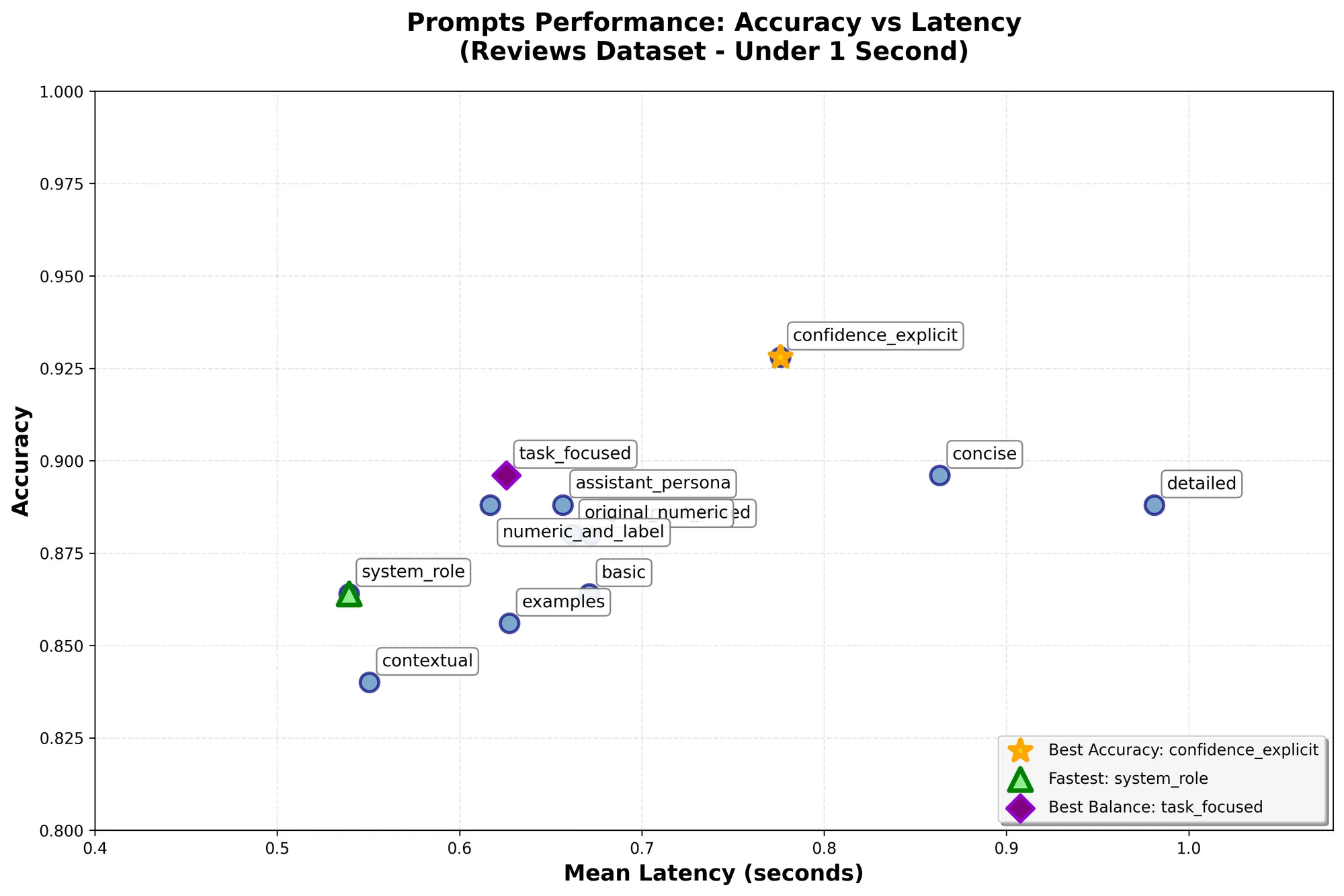
“system_role” - Winner of speed
System: You are a professional sentiment analysis system.
Your task is to classify text sentiment accurately and consistently.

User: Text: "{text}"

Classification: very_negative, negative, neutral, positive, or very_positive

Result:
This was the prompt that gave the fastest response time, on average ~0.54s per sample with ~86.4% accuracy.
Why was it the fastest? Two reasons (or at least this is our hypothesis): Using a fixed system prompt likely allowed OpenAI’s automatic prompt caching to kick in, which means less time was spent on reading the prompt. Additionally, the prompt explicitly asked only for a label as a response, which limited the output tokens to the bare minimum.
“confidence_explicit” - Winner of accuracy
Analyze the sentiment and provide your confidence level:

Text: "{text}"

First, classify the sentiment as: very_negative, negative, neutral,
positive, or very_positive
Then rate your confidence: low, medium, or high

Response format:
Sentiment: [classification]
Confidence: [level]
This was the prompt that reached the highest accuracy of 92.8%. Compared to the “worst” performing prompt that achieved only 84%, that’s an 8.8% improvement, which is substantial. It did come at the cost of speed, clocking 0.77s per sample on average, ~42% slower than the previous fast approach.
Another interesting point about this prompt: It asks the LLM to also provide its confidence level (similar to what you would get from an encoder-only transformer), yet we are not actually using that for the evaluation. Just the fact that we asked it to come up with a confidence level increased the overall performance.
”task_focused” - The Middle Ground
System: Classify text sentiment. Respond only with: very_negative, negative,
neutral, positive, or very_positive

User: "{text}"
This prompt was an attempt at reducing the instructions to the bare minimum while still being descriptive enough to get good accuracy, and hopefully leveraging prompt caching to the maximum.
The result was the “middle ground” for both worlds. It was relatively fast (~0.61s) and relatively accurate (~89.6%). It wasn’t the best in either, but it did provide the most balanced results of the bunch.
The thinkers that didn’t win the race
You will notice that none of the winners used fancy “prompt engineering” techniques, but that wasn’t due to a lack of trying. We did have some of those more sophisticated prompts in the benchmark, yet they yielded mixed results.
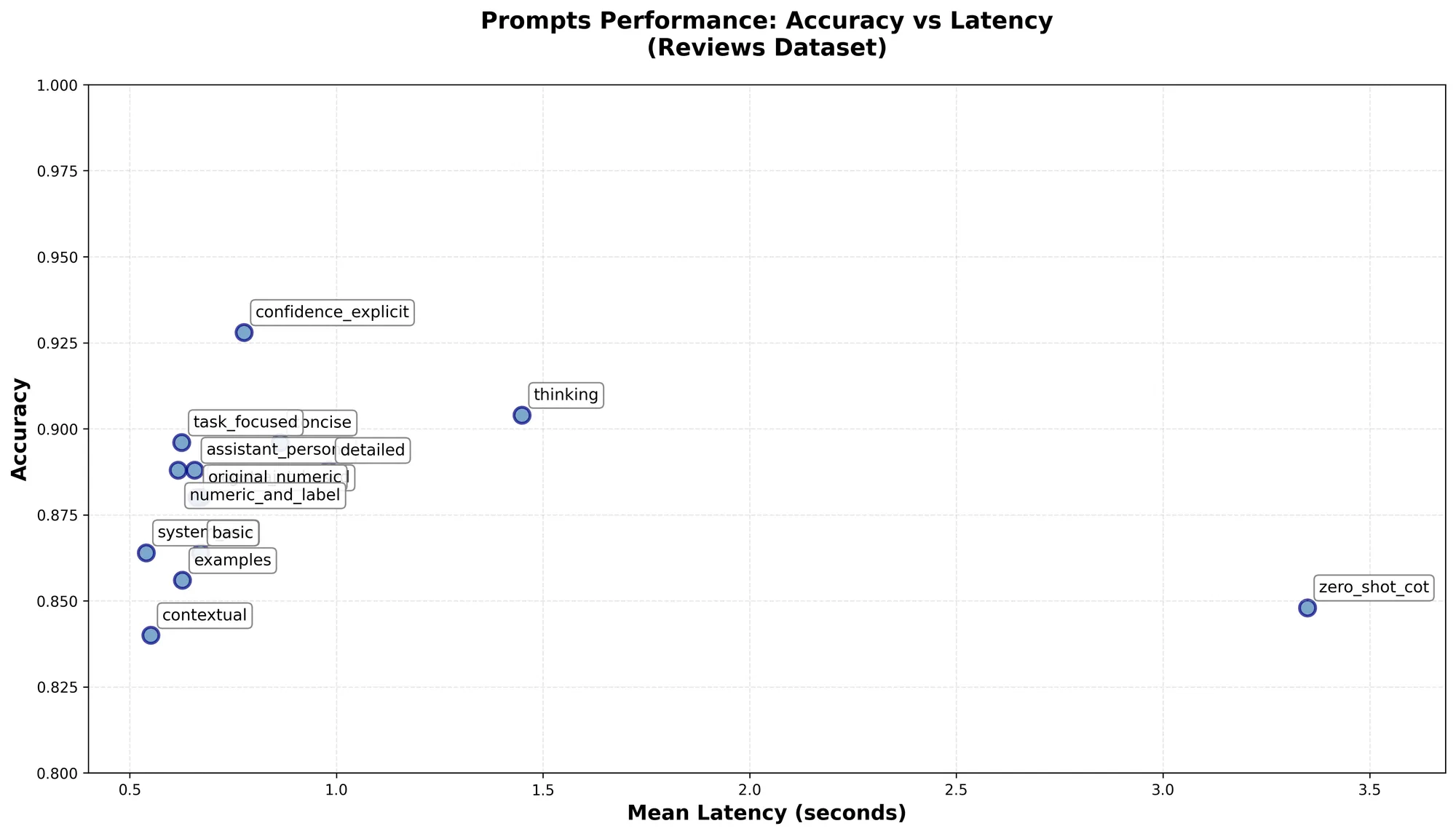
“zero_shot_cot” - The Slow Overthinker
Analyze the sentiment of this text using step-by-step reasoning:

Text: "{text}"

Let's think step by step:
1. What emotional words or phrases are present?
2. What is the overall tone?
3. Are there any contextual clues?

Based on this analysis, classify the sentiment as one of these labels (exactly):
- very_negative
- negative
- neutral
- positive
- very_positive

Final Answer: [Write EXACTLY ONE of the five labels above]
In this prompt, we are attempting a known technique called “Zero Shot Chain of Thought.” Unlike the rest, this one had to be tweaked quite a lot in order for it to even consistently return parsable results. The reason is that this prompt asks the LLM to yield a thought process rather than a simple answer.
This significant increase in output tokens means running this prompt is significantly more expensive than the rest, and also much slower - clocking at a whopping 3.35s per sample on average.
The biggest surprise was that despite this dramatic increase in cost and time, it yielded extremely poor results, with accuracy of 84.8%, one of the worst performers in the bunch.
“thinking” - The Surprise
Let me analyze the sentiment of this text step by step.

Text: "{text}"

First, I'll identify key emotional indicators in the text.
Then I'll consider the overall tone and context.
Finally, I'll classify the sentiment using one of these exact labels:
- very_negative
- negative
- neutral
- positive
- very_positive

The sentiment is: [Write EXACTLY ONE label from above]
This prompt was another variant on the CoT technique, usually called “first-person chain-of-thought prompting” or “self-talk prompting.”
As with the previous prompt, this one was also slow and yielded many more output tokens. On average, inference for a sample took 1.44s. However, unlike the previous prompt, this one actually worked and reached 90.4% accuracy - ranking it the 2nd best performer of the lot.
Prompts also fail in interesting ways
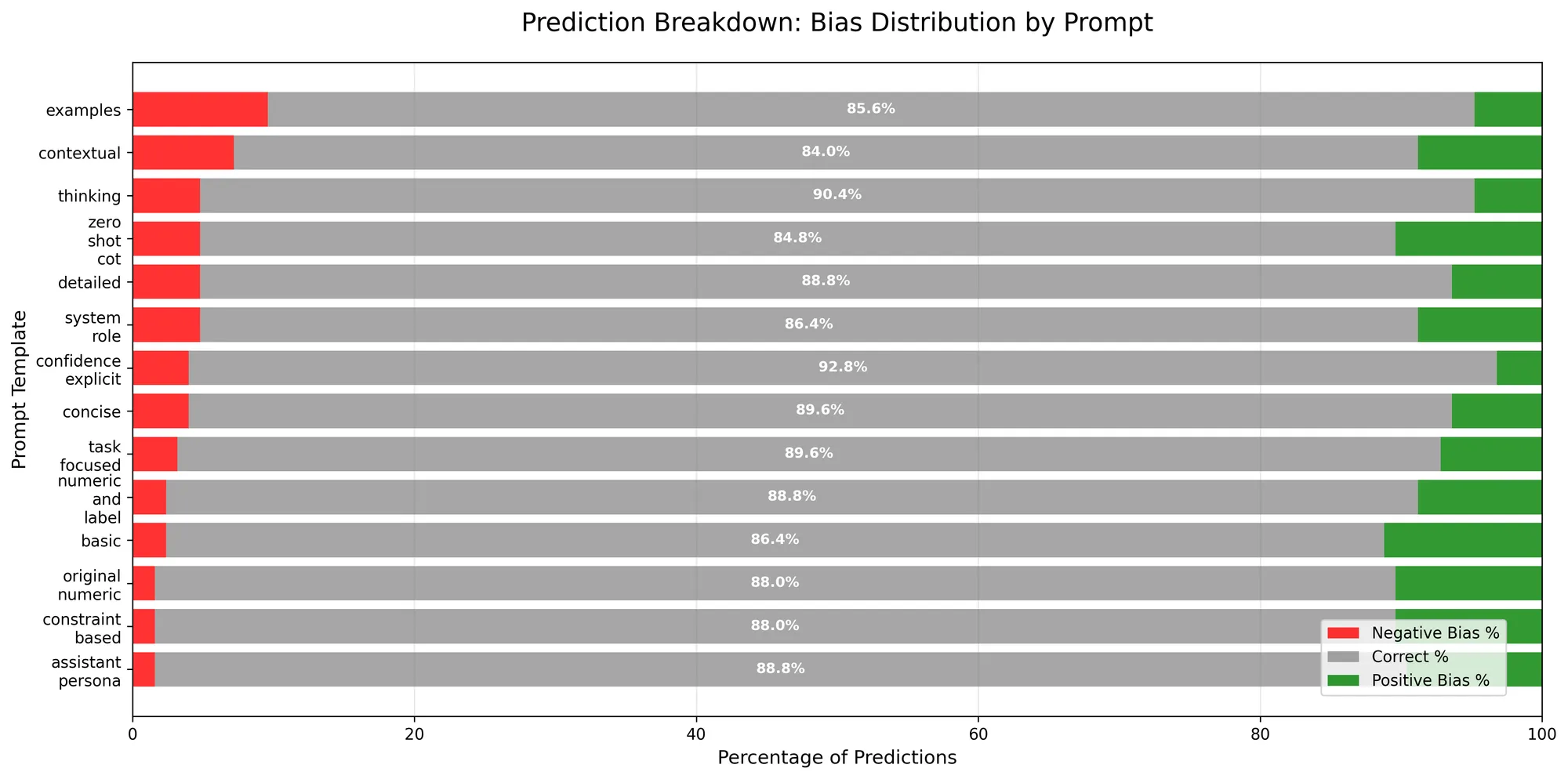
Spanning from 84% to 92.8% accuracy, we couldn’t get any of the prompts to correctly predict the sentiment of the entire test set, which is to be expected.
Most commonly, we saw confusion between subclasses of the same sentiment, such as very_negative → negative. Again, not much surprise there - 5-class sentiment classification is a hard task, with many grey area cases that very much depend on interpretation.
One noteworthy finding was that we did see bias in different prompts for different types of classification mistakes. Some prompts biased towards more positive classifications and some towards more negative. The reason to why, is obviously unknown to us.
Takeaways
Even at the current generation of LLMs, the prompt still plays an extremely important role in performance for tasks. Using the right prompt could get a model like gpt-4.1-mini to outperform a superior model like gpt-4.1 when using a lesser prompt.
Additionally, understanding what you are optimizing for is key to correctly choosing a prompt. The prompt is a dial, not a switch - you need to tune it for your goal (in this case, accuracy vs. latency and cost).
The checklist for writing the “perfect prompt”
- Define what you are optimizing for - quality, speed, or maybe something else.
- Experiment by testing multiple approaches against an evaluation test set.
- Find your winners, create more approaches to try and optimize, test, rinse, repeat.
- Continuously check the performance of your prompts, as models change and the problems you are trying to solve evolve.
Appendix: Why only OpenAI and why not GPT-5
We purposefully chose not to run this benchmark using any of the gpt-5 series models, as at the time of writing this (early August 2025) all of them unanimously underperformed both the gpt-4.1 and gpt-4o series for this specific task.
Additionally, we could have continued running this benchmark forever - different models from other vendors, more prompts, more datasets, etc. However, for the sake of this experiment, we chose to focus on a single model, assuming that the prompt’s effect on performance would look similar in other cases. But you are welcome to show us your results!
First published on Wix Engineering, 18 August 2025.